TLamb019390 (Community Member) asked a question.
How can I export the flaws grid to excel, or even a text file

TLamb019390 (Community Member) asked a question.
Ask the Community
Get answers, share a use case, discuss your favorite features, or get input from the community.
By clicking “Accept All Cookies”, you agree to the storing of cookies on your device to enhance site navigation, analyze site usage, and assist in our marketing efforts.
.png)
These cookies are necessary for the website to function and cannot be switched off in our systems. They are usually only set in response to actions made by you which amount to a request for services, such as setting your privacy preferences, logging in or filling in forms. You can set your browser to block or alert you about these cookies, but some parts of the site will not then work. These cookies do not store any personally identifiable information.
These cookies allow us to count visits and traffic sources so we can measure and improve the performance of our site. They help us to know which pages are the most and least popular and see how visitors move around the site. All information these cookies collect is aggregated and therefore anonymous. If you do not allow these cookies we will not know when you have visited our site, and will not be able to monitor its performance.
These cookies may be set through our site by our advertising partners. They may be used by those companies to build a profile of your interests and show you relevant adverts on other sites. They do not store directly personal information, but are based on uniquely identifying your browser and internet device. If you do not allow these cookies, you will experience less targeted advertising.

Hi TLamb019390,
It depends on what you're trying to accomplish. There are a number of data extracts that can be generated and downloaded in CSV format by going to the "Analytics" menu --> Reports Subsection --> Data Exports. There you can get data across your application portfolio in a number of different ways (https://help.veracode.com/reader/kJC1iOtXp8N~rCtV8P9jhw/3y~DzJxJ3rn05RxVTkakHw) Please note that you'll need the "Security Lead" or "Administrator" role to get those sorts of "cross portfolio" reports.
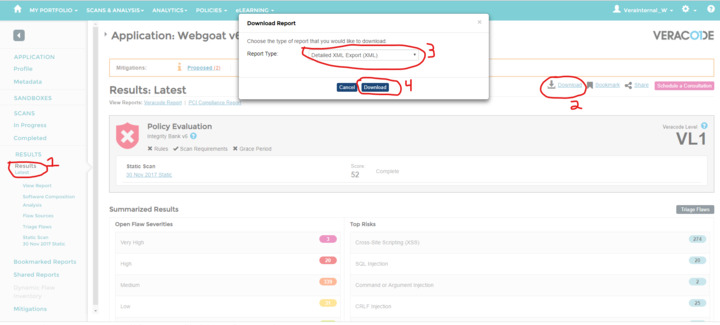
If you are interested only in working with results data for one specific application, you can also download the "Detailed XML Export" for the application you want to work with and import it into Excel to work with there. I'm not the best at sanely importing XML data into Excel, but can try to find some more information if you get stuck.
To download detailed results, go the results set for the application you are interested in (Typically in the "Results Latest" part of your application) and then download the Detailed XML Report (see screenshot below).
This will download the detailed XML Results for your application and the XML Schema Document.
From there you can import it into Excel.
I hope this helps!
-Bill
Oh... Looks like the picture didn't go along with my post... here's the picture: